
PARTONS: PARtonic Tomography Of Nucleon Software
This page:
about
instalation
usage
development
license
acknowledgements
contact
View GitHub repository:
link
View Docker repository:
link
Usage
Minumum working example
We start with a minimum working example demonstarting how to run PARTONS. We assume that a PARTONS installation is available to you, if not see this page.
- Open the terminal.
- Go to the root directory of your partons-example installation:
# you may need to adapt this line cd partons-example - Run one of the examples:
./bin/PARTONS_example data/examples/gpd/computeSingleKinematicsForGPD.xml - At this point you should see the output of the played scenario: values of GPDs, including singlet and non-singlet combinations, for a single kinematics and for GPD types and partons available in the chosen model. Study the example by using e.g. a text editor of your choice.
Introduction
Here we explain how to use PARTONS in more detail. There are two main ways to use PARTONS:
- using XML files - The main advantage of this approach is the ability to perform complex tasks in a simple and generic way, without writing a single line of C++ code or rebuilding the project. See the Using XML interface section.
- writing a standalone program - This requires knowledge of C++ programming and the PARTONS codebase. We recommend this method only for the most complex and sophisticated tasks. See the Using C++ interface section.
For the purpose of this tutorial, we will use the partons-example project. project. By default, this project is configured to run XML scenarios (see the Minumum working example section). A collection of sample XML scenarios can be found in the data/examples directory.
The project also includes a main.cpp file, which demonstrates how to properly call and handle the PARTONS library in a standalone program. With a minor modification, clearly indicated in main.cpp, the partons-example project can also be used to run any C++ code based on the PARTONS library. A collection of sample C++ functions is provided in the examples.h (header) and example.cpp (source) files.
The executable that invokes the PARTONS library will look for two configuration files, where the main one (partons.properties) should be placed in the same directory as the executable. See the Configuration files section for more details.
Using XML interface
We refer to a set of physics assumptions as a scenario. In this section, we demonstrate how a single scenario can be encoded in an input XML file and evaluated (or played) by PARTONS. This will be illustrated using an example that evaluates one of the Fourier moments of the DVCS beam charge asymmetry, \(A_{C}^{\cos 2\phi}\), at a single kinematic point.
<?xml version="1.0" encoding="UTF-8" standalone="yes" ?>

<scenario date="2017-06-15" description="How to compute an observable">

    <task service="DVCSObservableService" method="computeSingleKinematic">

        <kinematics type="DVCSObservableKinematic">
            <param name="xB" value="0.1" />
            <param name="t" value="-0.1" />
            <param name="Q2" value="2." />
            <param name="E" value="12." />
      <param name="phi" value="20." />
        </kinematics>

        <computation_configuration>

            <module type="DVCSObservableModule" name="DVCSAcCos2Phi">

                <module type="DVCSProcessModule" name="DVCSProcessGV08">

                    <module type="DVCSScalesModule" name="DVCSScalesQ2Multiplier">
                        <param name="lambda" value="1." />
                    </module>

                    <module type="DVCSXiConverterModule" name="DVCSXiConverterXBToXi">
                    </module>

                    <module type="DVCSConvolCoeffFunctionModule" name="DVCSCFFStandard">

                        <param name="qcd_order_type" value="LO" />

                        <module type="GPDModule" name="GPDGK11">
                        </module>
                    </module>
                </module>
            </module>
        </computation_configuration>
    </task>

    <task service="DVCSObservableService" method="printResults">
    </task>

</scenario>
Let us analyze the structure of this scenario step by step:
- the scenario begins with a standard XML preamble enclosed between
<? ... ?>tags. This preamble must be included in each of your XML scenarios and should not be modified - it is used exclusively by XML parsers. - the main scenario is defined between
<scenario> ... </scenario>tags. For convenience and proper record keeping, include both the creation date and a brief, unique description of the scenario. - the scenario contains two tasks, each defined between
<task> ... </task>tags. The opening tag specifies the target Service (service = "...") and the method (method = "..."`) to be called. In this example, the first task performs the computation, while the second prints the result to the standard output. - in the computational task, the input kinematics of a given type are defined between
<kinematics> ... </kinematics>tags. They can be specified directly in the XML file (as shown here) or via external text files for more convenient list handling. - the physics assumptions are defined between
<computation_configuration> ... </computation_configuration>tags. This nested structure specifies the PARTONS modules to be used and corresponds to the following computation structure: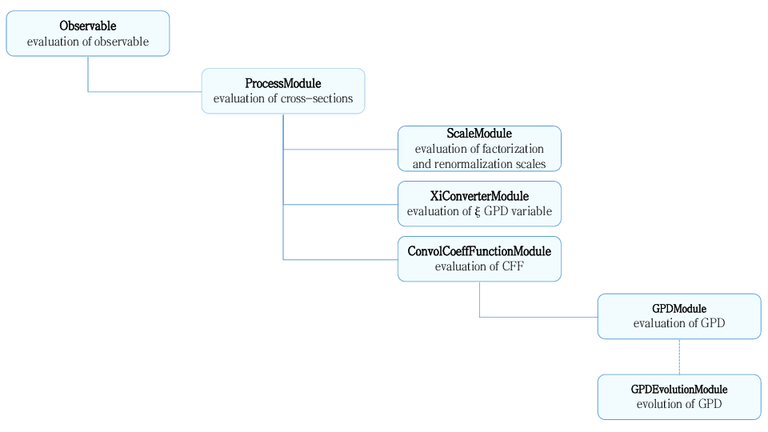
Using C++ interface
These are the most important notes regarding the use of the PARTONS C++ interface. Due to the complexity of this topic, we recommend studying the examples provided in the partons-example project.
- The recommended way to use PARTONS, even when working with the C++ interface, is through Services, which abstract away the complexity of low-level operations.
- PARTONS employs a Registry/Factory mechanism. The Registry acts like a “phone book”, listing all available modules. From a software engineering perspective, it implements the singleton design pattern, ensuring there is only one instance.
- When a new module is created during execution, the first step is to access this unique instance and register the new module under the class name provided by the developer. In return, the Registry assigns a unique identifier encoded as an integer variable.
- When the user wants to create a new instance of a registered class, they call the Factory, which clones the original object from the Registry and returns it. The clone can be retrieved from the Factory using either the class name or the unique identifier. For example, to obtain an instance of
GPDGK11, we use:// Not optimal, mainly used by the XML parser PARTONS::GPDModule* pGK11Module1 = PARTONS::Partons::getInstance()->getModuleObjectFactory()->newGPDModule("GPDGK11"); // Recommended, as it is faster and avoids hard-coding character strings. PARTONS::GPDModule* pGK11Module2 = PARTONS::Partons::getInstance()->getModuleObjectFactory()->newGPDModule(PARTONS::GPDGK11::classId); - PARTONS uses a Logger mechanism. Use it whenever possible instead of functions like
printf()orstd::cout. This ensures consistent output and preserves the continuity of the information stream. Because the Logger runs on a separate thread from the computation (which prevents parasitic printing from slowing down the process), any information sent via the Logger and, for example, throughprintf()will not be properly synchronized.debug(__func__, ElemUtils::Formatter() << "Debugging information"); info(__func__, ElemUtils::Formatter() << "Information"); warn(__func__, ElemUtils::Formatter() << "Warning"); throw ElemUtils::CustomException(getClassName(), __func__, ElemUtils::Formatter() << "Error");Here, we assume that the functions are called from a method of a class that inherits from
BaseObject, which is the case for all modules, for example. Let us call this classMyClassand the methodsomeFunction()`. The output returned by the Logger will then be similar to the following:26-06-2017 12:11:52 [DEBUG] (MyClass::someFunction) Debugging information 26-06-2017 12:11:52 [INFO] (MyClass::someFunction) Information 26-06-2017 12:11:52 [WARN] (MyClass::someFunction) Warning 26-06-2017 12:11:52 [ERROR] (MyClass::someFunction) Error - The last type is an exception that stops execution (if it is properly caught and handled by the program). The appearance of each type of information in the PARTONS output depends on the Logger’s configuration, see the Configuration files section.
- The Formatter,
ElemUtils::Formatter, is a stream buffer that enables the construction of sophisticated character strings from simple types, for example: ```cpp double a = 1.12; int b = 2; bool c = false; std::string d = “ddd”;
ElemUtils::LoggerManager::getInstance()->info(“SomeClass”, “someFunction”, ElemUtils::Formatter() « “We have: “ « a « ” “ « b « ” “ « c « ” “ « d);
which gives:
```shell
26-06-2017 02:20:28 [INFO] (SomeClass::someFunction) We have: 1.12 2 0 ddd
Here, we have demonstrated how to use the Logger outside of a class that inherits from BaseObject.
Configuration files
PARTONS uses two configuration files:
partons.properties- the main configuration filelogger.properties- the Logger configuration file
partons.properties
This is the main configuration file of PARTONS and should be placed in the same directory as the executable. All options are explained in the comments, which start with the hash symbol #:
# PATHS #

# Path to the configuration file of Logger
log.file.path = /path/to/logger.properties

# Path to the environment configuration information
environment.configuration.file.path = /path/to/environment_configuration.dat

# Path to the directory containing PDF replicas
grid.directory = ../partons/data/grid/

# Validation scheme used by XML parser
xml.schema.file.path = ../partons/data/xmlSchema.xsd

# THREAD #

# Number of available processors to be used by threads
computation.nb.processor = 1

# Maximum size of batch for a given type (in one task several batches may be run in separate threads)
gpd.service.batch.size = 1000
ccf.service.batch.size = 1000
observable.service.batch.size = 1000
The file xmlSchema.xsd, used by the XML parser, is provided with the executable project partons-example in the data directory.
logger.properties
This is the configuration file for the Logger. Its path should be set in partons.properties using the log.file.path option. All options are explained in the comments, which begin with the hash symbol #:
# Enable Logger:
# true   - Logger enabled
# false  - Logger disabled
enable = true

# Logger output policy:
# ERROR  - print errors only
# WARN   - print warnings and errors only
# INFO   - print info, warnings and errors only
# DEBUG  - print all, i.e.: debug, info, warnings and errors
default.level = INFO

# Logger output policy may be also set locally, i.e. for a single PARTONS module. E.g.
# logger.DVCSCFFHeavyQuarkModel = DEBUG
# can be used to set the debugging mode for DVCSCFFHeavyQuarkModel module only

# Logger destination:
# COUT   - standard output only
# FILE   - text file only
# BOTH   - both standard output and text file
print.mode = BOTH

# Path to the directory containing Logger output text files
log.folder.path = /path/to/output/folder